mds_stores · part of macOS
Spotlight store
○ Leave itWrites and reads the index that makes Spotlight search fast.
While Spotlight is indexing. Usually: 10 to 30 minutes, longer after an update.
macOS starts it again straight away. Leave it.
A Mac app by nicoleslittlebrother
See what’s running on your Mac in plain English, what’s safe to close, and what would help most when it’s struggling.
With Apple for review since 28 Oct
See it free. Pay once, keep watch as long as you like. macOS 26 or later
Why is my Mac slow?
Memory pressure · Calm
Your Mac is calm. Plenty of headroom.
Memory pressure · Tight
Memory is getting tight.
Memory pressure · Short
Your Mac is short of memory.
What would help most Likely to come back
Estimates come from what each app is using now. macOS may keep some of it as cache.
Reading
Calm for the last 40 minutes. The 1.0 GB in swap is left over from earlier. It isn’t slowing anything now.
Memory is filling up. macOS is compressing what it can.
Memory has been short for 5 minutes, so macOS is swapping to disk. That’s the slowness you feel. Wayfarer is using 5.5 GB. Closing it would help most.
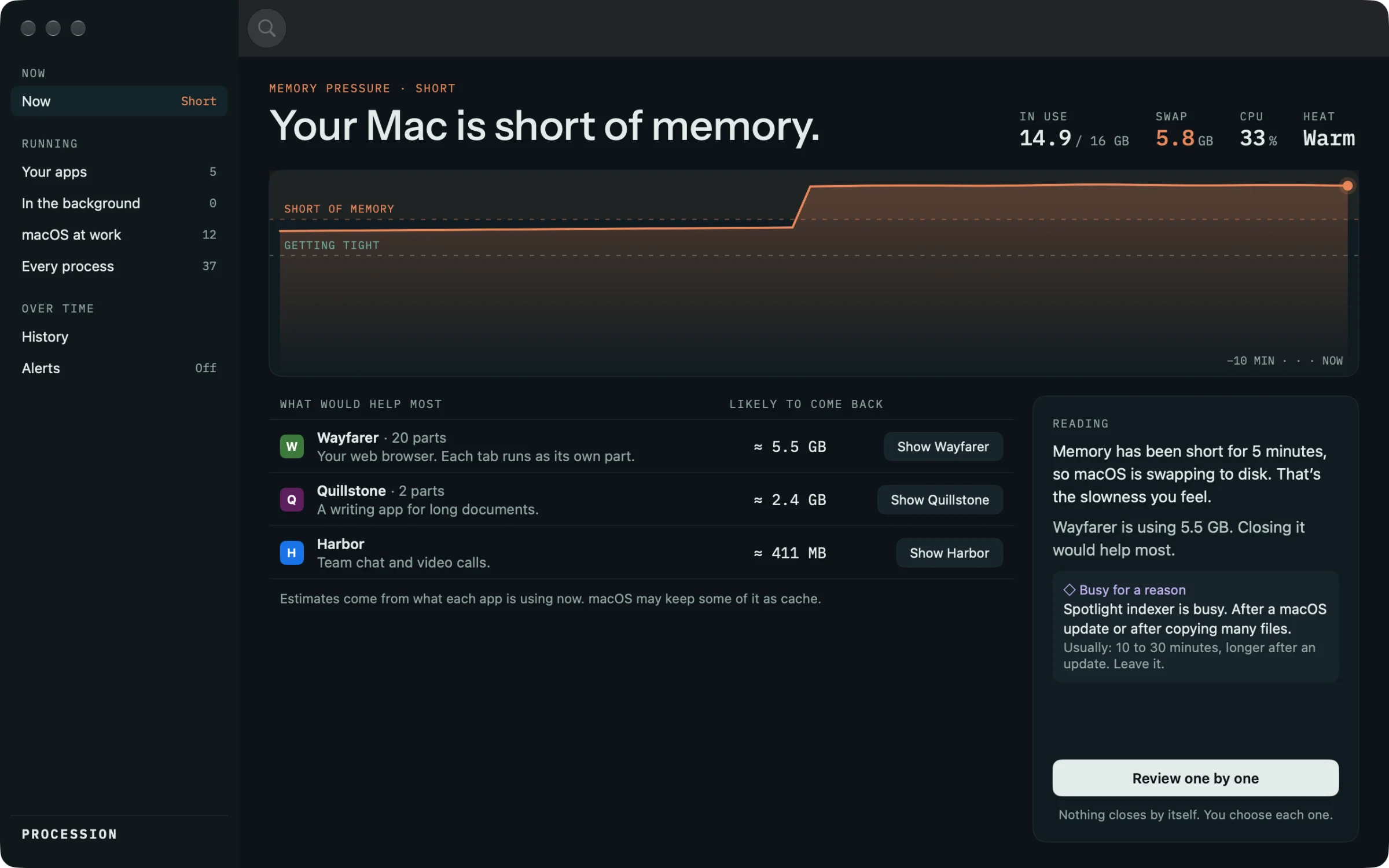
Procession reads memory pressure the way macOS reports it, and never claims to know more.
Everything, introduced
Procession’s guide explains 220 apps, helpers and parts of macOS by name, in plain English. These are its own words. The whole guide
mds_stores · part of macOS
Writes and reads the index that makes Spotlight search fast.
While Spotlight is indexing. Usually: 10 to 30 minutes, longer after an update.
macOS starts it again straight away. Leave it.
WindowServer · part of macOS
Puts every app’s windows together on the display. More displays, transparency and animation make it work harder.
Video is playing, windows are moving, or several displays are connected. Usually: while that’s happening.
Stopping it logs you out straight away and closes every app. Leave it.
kernel_task · part of macOS
The kernel: the part of macOS that runs everything else. When the Mac gets hot, it deliberately keeps the processor busy so other apps slow down and the Mac cools.
The Mac is warm, charging hard, or driving an external display. Usually: until it cools down.
It can’t be stopped. If it’s busy, let the Mac cool: close heavy apps and give it air.
Google Chrome Helper (Renderer) · part of an app
Chrome runs each tab and extension as one of these, so a broken page can’t crash the others. Many open tabs means many of these.
A tab is playing video, running a web app or stuck in a loop. Usually: until you close or pause that tab.
Closing one makes that tab show “Aw, Snap!”. Close the tab in Chrome instead, or close Chrome.
bird · part of macOS
Moves files between your Mac and iCloud Drive.
After adding or changing many files in iCloud Drive. Usually: until syncing finishes.
macOS starts it again straight away. Leave it.
node · in the background
Node.js runs JavaScript outside a browser. Many developer tools and some apps start it in the background.
Whatever started it loses that tool, sometimes mid-task. Stop it from the app or Terminal that started it.
Slack · your app
Slack is built with web technology, so it runs as several parts: one main app, plus helpers for each window, graphics and networking.
You won’t get message alerts until you reopen it. Nothing is lost. It catches up.
Show and close
Procession brings the app forward. You close it with ⌘Q, and it tells you how much came back. An App Store app can’t quit other apps, and Procession wouldn’t if it could.
How it looks
The answer first: one sentence, the readings and the line. Then what would help most, with about how much each would give back.
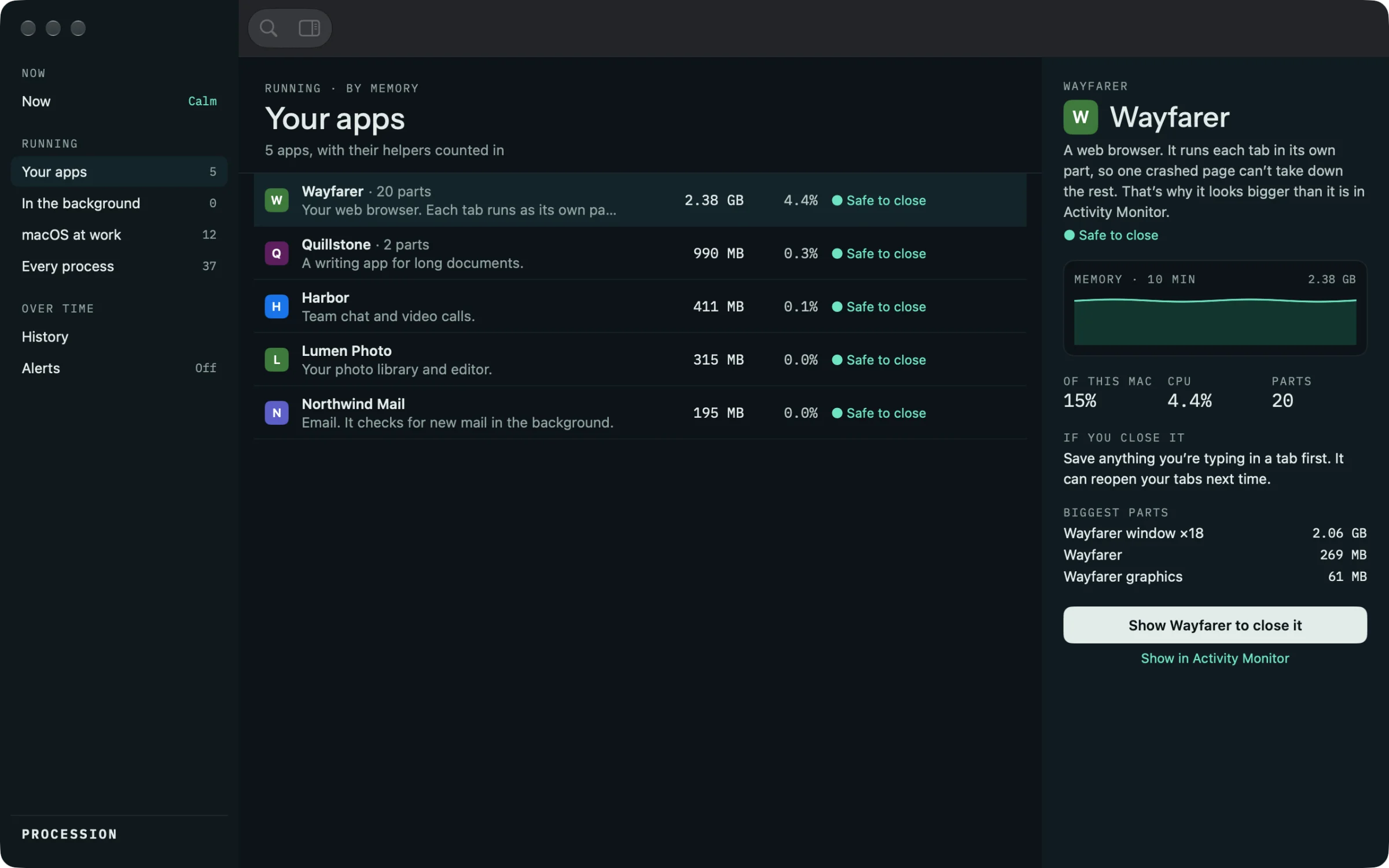
Each app with its helpers counted in. The inspector says what it is, what happens if you close it, and its biggest parts.
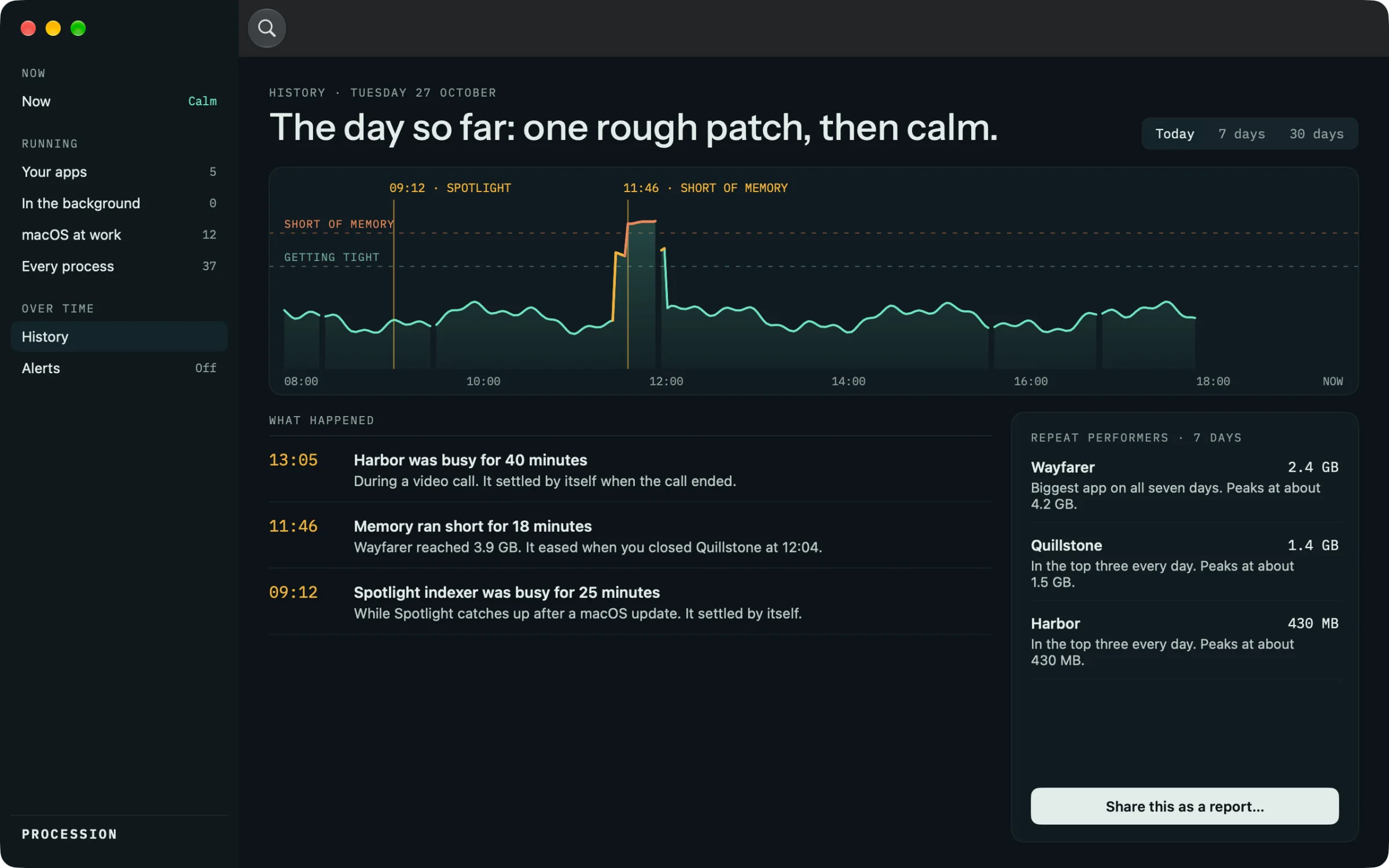
With the unlock: the day, the week or the month on one line, what happened, and the apps that are biggest day after day.
The film · 1:45
Short of memory, then Show and close, the explanations, History and the menu bar, on a made-up Mac.
Procession reads process names and figures on your Mac, never command lines or what’s inside an app. History stays on your Mac. Nothing is collected. The privacy policy
Price
Always free
€0
Unlock, once
€4.99once
£4.99 in the UK and $4.99 in the US; prices vary slightly by country. No subscription, no account, paid through the Mac App Store. One purchase covers every Mac you use with your Apple Account.
Not by itself, and nothing claiming to free memory really does. Procession shows what’s using your Mac and which apps would help most if you closed them. You close them, and it tells you what came back.
No, on purpose. It brings the app forward so you can close it with ⌘Q. Apps from the App Store can’t quit other apps, and Procession wouldn’t if it could.
No. It reads process names and figures on your Mac, never command lines or what’s inside an app. Nothing leaves your Mac, and there’s no account.
Watching and every explanation are free. One €4.99 purchase unlocks history, alerts, the menu bar extra, Review one by one and the report, on every Mac you use with your Apple Account. No subscription.
Activity Monitor lists everything with its technical name. Procession adds up each app with its helpers, names everything in plain English, says what’s safe to close, and answers why your Mac is slow.
Memory pressure · Calm
With Apple for review since 28 Oct